
What’s new on CDS
We are happy to announce several new features now available on CDS.
GitHub and GitLab software archiving
You can now connect your GitHub or CERN GitLab account to CDS and archive your software releases automatically. Once you enable a repository, each new release will create a record on CDS with a ZIP archive of the repository contents and automatically extracted metadata.
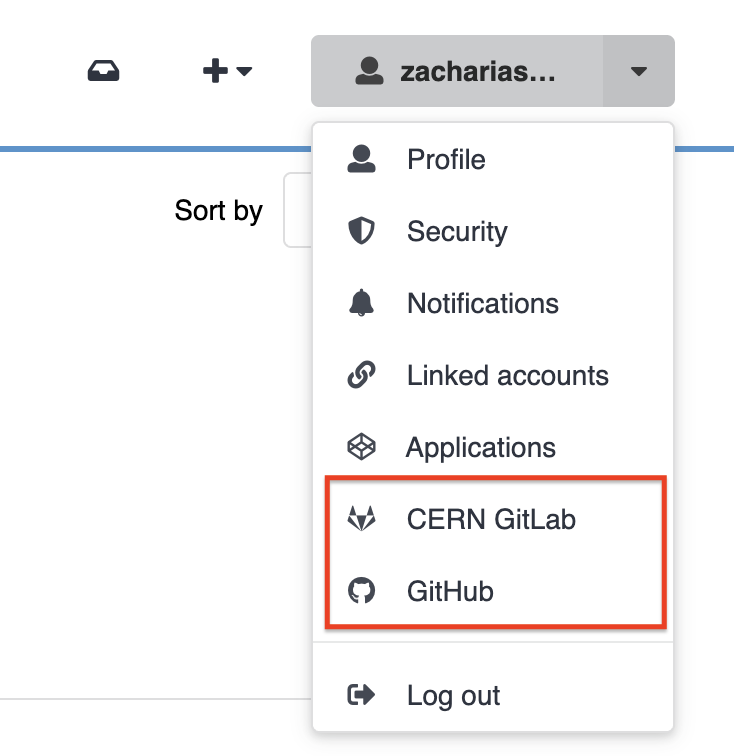
To get started, open the user menu and select CERN GitLab or GitHub, then enable the repositories you want to archive.
You can also assign each repository to a community and track the status of each release directly from CDS.
Read the full guide on publishing repositories
Community collections
Community managers can now organize their community’s records into collections — curated groupings based on search filters that make it easier for users to browse and discover content by topic or theme.
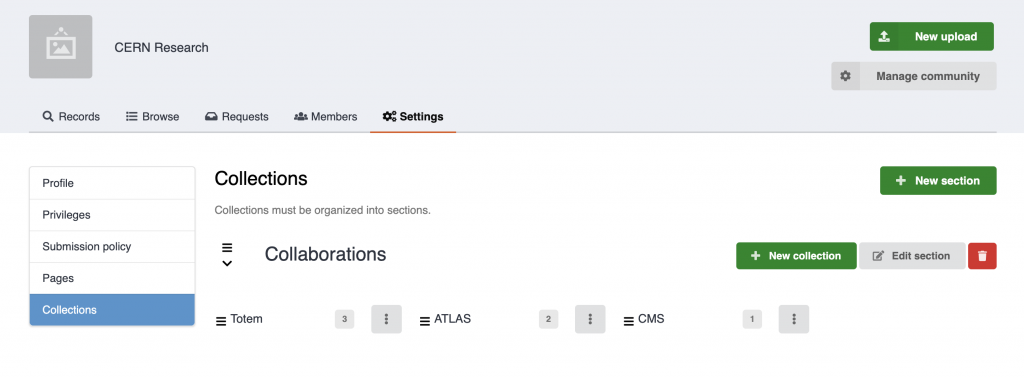
Collections are managed from the community settings page, where owners can create sections, add nested collections, define the search query behind each collection, and reorder them via drag and drop.
Read how to set up collections
Simplified search queries
We have simplified the query syntax for common search fields. You can now use shorter, more readable terms when searching. For example:
| Before | After |
|---|---|
metadata.title:<value> | title:<value> |
metadata.identifiers.identifier:<value> | identifier:<value> |
The full list of supported fields and advanced query options — including phrase search, date ranges, wildcards, and more — is now covered in the documentation.
Documentation
All of the above features are now covered in the CDS documentation 🚀. If you run into issues or have ideas for improvements, let us know through the usual CDS support channels.